IT Network support is one of the many services we provide our clients. This can range from infrastructure setup to, in this case, strategies to limit usage and prevent extra charges.
This was a particularly unique project as we were supporting a client located on a remote Scottish Island with limited internet and mobile service. In this article, we will look at the problem in hand, how we helped to resolve the network issue, and strategies we put in place to ensure high quality service in the future.
Problem to be solved:
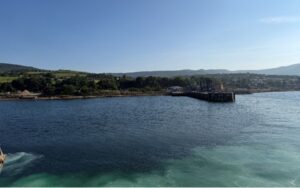
Our client is located on the Isle of Arran and they are at a part of the island that does not benefit from decent internet or mobile service.
They purchased a Starlink service from another 3rd party provider and required IT network support to resolve the issues they were facing with the satellite internet. This service delivers a great internet connection, however at the time of purchase, they had to pick a monthly bandwidth allowance. Although they went with the maximum they could, they have since discovered that they are using way over that limit and are having to pay very hefty monthly fees for the extra bandwidth being used.
The client approached us to see if there was a way we could limit the usage to prevent these extra charges.
IT Network Support: The Solution
We reviewed the existing setup and realised that some of the existing network hardware was not up to the task. Therefore, we researched the equipment needed and produced a proposal to the client.
Once this was accepted, the new equipment was purchased. The initial configuration was then completed prior to planning the on-site visit to deployment.
Leading up to the visit
In the days prior to the visit, we had to think through every possible bit of additional kit, tools and access equipment we might need. With jobs in remote areas like this, it isn’t possible to just nip to a shop or supplier for anything that might be needed to complete the job. Having to come back because of a forgotten item would not be easy. Therefore, a lot of planning went into the project to cover this eventuality.
Ferry Issues
Our first attempted visit didn’t go ahead as planned due to issues with the ferry. Thankfully as this was not an emergency visit, the client was very understanding, and we rebooked the visit for the following week.
On the Day
Steve left his house at 4:30am in order to ensure there were no issues in getting to Troon for the ferry over at 7:30. Any delays on the way would result in a missed ferry and potentially more delays for the work.
Thankfully he got there in plenty of time and managed to reach the client site for around 9:30.
Implementing the IT Network Support
Once on site, the first task was to check over everything on the network to ensure we had accurate notes on how things were connected. This was to ensure we wouldn’t cause any unnecessary downtime for the client when putting in the new equipment.
The business has both an active retail and busy restaurant as part of the site. Due to this, we warned all of the various departments that there would be some downtime. However, it was important to try and minimise downtime as much as possible to prevent them having any customer issues.
We started the equipment changed over around 11am and had the first parts of the site back online around 30 minutes later. Of course, the very minute we started removing the old kit, a customer wanted to make a payment so that added a bit of urgency to the works from the off.
We managed to get that particular department back online temporarily so they could complete their purchase. We could then get back to getting all the new kit installed and commissioned as part of the IT network support.
All New Equipment in Place
With all the new equipment in place in the main part of the building, we were then able to start testing to make sure the connected equipment was back online and functioning as normal. Thankfully that all went fine and we could then start testing out the connection limitation settings.
In this case, we have setup two networks. An unrestricted network for the staff to use for business purposes, and a separate guest network to use for visitors. It is the guest network that has been limited to prevent the runaway costs that had been happening previously.
With everything in that part of the building sorted it was onto the two other parts of the building which needed their own new equipment put in place. These changes went much quicker as there was less needed and all went in fine.
Before and After
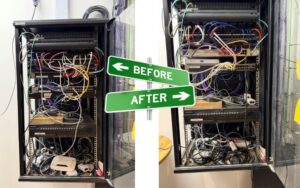
Commissioning Completed
By 3:30pm, Steve had completed commissioning and testing and the client was happy that everything was still working as expected. All that was left to do was finish tidying up, pack the tools back in the car and head back to the port for the ferry back.
Thankfully it was a lovely day so the wait for the 6:30pm ferry back to Troon was a chance to catch up with emails and enjoy the view.
Steve arrived back home just after 9:30pm. A total of 230 miles travelled and 17 hours time on the day.
Ongoing Monitoring
Following the visit, we are now monitoring usage to see if any further changes are needed in order to improve the setup. The new equipment installed has much better overview of what devices are using the network the most, and if needed, restrictions can be put in place to limit what they can do.
IT Network Support With Upstream IT
If you are facing a similar network issue and are in need of expert IT support, our team are here to help. You can find out more about our IT services on our website. You can also contact us today on 0131 513 9971 or info@upstreamit.co.uk
Leave a Reply